Understanding Control Flow in JavaScript
When we write programs, the code does not always run in a straight line. Sometimes we need the program to make decisions. For example:
If a person is older than 18, allow them to vote
If marks are above 40, the student passes
If today is Sunday, print "Holiday"
Situations like these require control flow.
Control flow simply means controlling which part of the code runs depending on conditions.
In JavaScript, this is usually done using if, else, and switch.
The if Statement
The if statement is the most basic way to make a decision in code.
It runs a block of code only when the condition is true.
Example idea:
let age = 20;

if (age >= 18) {
  console.log("You can vote");
}
Here the program checks the condition first. If the condition is true, the code inside the block runs. If it is false, nothing happens.
You can think of it like a simple real-life rule:
If it is raining, take an umbrella.
The if-else Statement
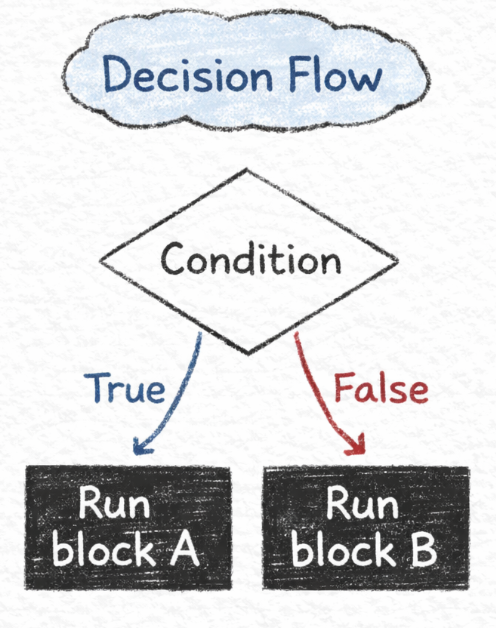
Sometimes we want to run one block of code if the condition is true and another if it is false.
That is where else is used.
Example:
let marks = 35;

if (marks >= 40) {
  console.log("You passed");
} else {
  console.log("You failed");
}
The program checks the condition first.
If the condition is true → first block runs
If the condition is false → second block runs
So the program always chooses one path.
The else if Ladder
In real programs we often need to check multiple conditions, not just one.
For example grading systems:
Above 90 → A grade
Above 75 → B grade
Above 50 → C grade
Otherwise → Fail
Example idea:
let marks = 82;

if (marks >= 90) {
  console.log("Grade A");
} else if (marks >= 75) {
  console.log("Grade B");
} else if (marks >= 50) {
  console.log("Grade C");
} else {
  console.log("Fail");
}
The program checks conditions one by one from top to bottom.
The first condition that becomes true will run its block, and the rest will be skipped.
The switch Statement
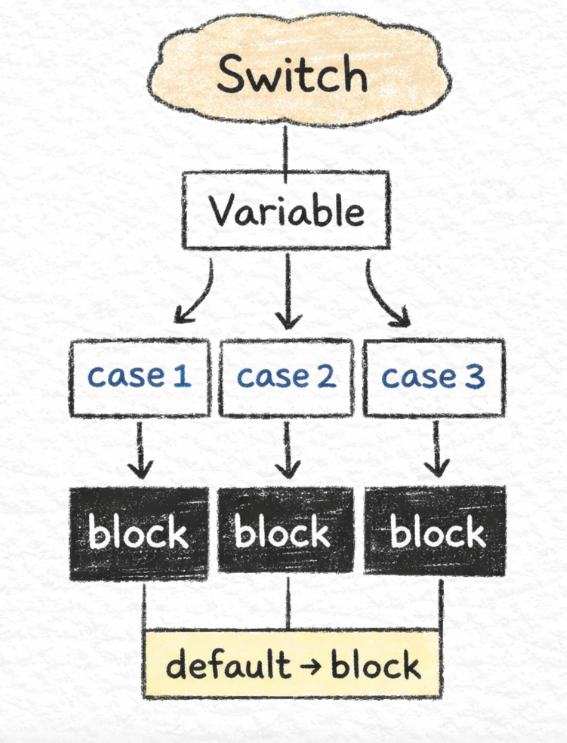
Sometimes we need to check one value against many possible cases. Instead of writing many else if conditions, JavaScript provides the switch statement.
Example: printing the day of the week.
let day = 2;

switch (day) {
  case 1:
    console.log("Monday");
    break;

  case 2:
    console.log("Tuesday");
    break;

  case 3:
    console.log("Wednesday");
    break;

  default:
    console.log("Invalid day");
}
The switch statement checks the value of day and matches it with the correct case.
Why break Is Important in switch
Inside a switch, the break statement stops the program from continuing to the next case.
If break is missing, the program will continue executing the next cases even if they do not match.
That is why break is usually written after each case.
When to Use switch vs if-else
Use if-else when conditions involve comparisons.
Example:
checking marks
checking age
checking numbers greater or smaller
Use switch when comparing one variable to many fixed values.
Example:
days of the week
menu options
months of the year
Both are useful, but they solve slightly different problems.
Conclusion
Control flow allows programs to make decisions. Using if, else, and switch, we can control how our code behaves depending on different situations.
These concepts are important because almost every real program needs decision-making logic.
Once you are comfortable with control flow, writing more complex programs becomes much easier.